When delegating authentication and authorization to a web-role, storing and retrieving the authorization and user profile data with an authentication cookie is very useful. Here is a simple solution.
The context of this post is an MVC pattern whereby authentication and authorization is delegated to a back-end (Azure) web-role; the post is applicable to any backend service implemented in any language and deployed on any cloud framework.
The context sequence diagram described below starts with the browser requesting a page prior to login. In step1, upon receipt of the request, the view cannot find the authentication cookie, and forwards the request to the login page. The login form collects the login information and passes it to the controller. At this point, the controller delegates the authentication and authorization to a middle-tier web-service, which verifies the credentials, retrieves the permissions and user profile information associated with those credentials. The controller forwards the data received from the middle-tier to the view, which uses the information to render the HTML of target page.
In subsequent requests, depicted in step 2, the view receives the authorization and user-profile information from the controller, which retrieves it from the cookie. The rendering of the page proceeds through conditioning on the data retrieved form the cookie.
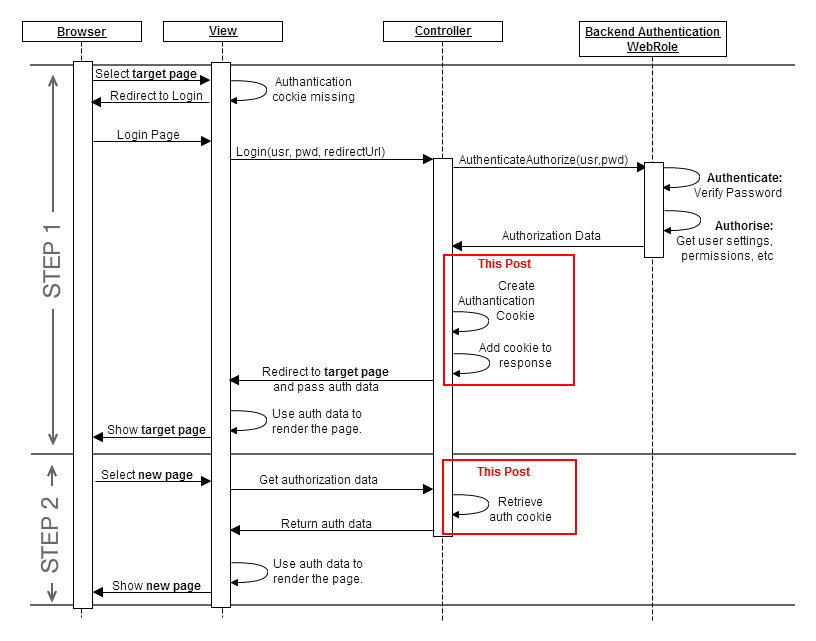
The code for step 1 is listed below. Start by asembling the URL for the authentication and authorization REST request to the middle-tier. If authentication passed, then we populate the user data using some structured text format; a simple approach would be to use JSON. Next, populate the data in the authentication ticket, wrap it with a cookie which is added to the response.
C# MVC4 controller code for Step 1.
[HttpPost]

[AllowAnonymous]

[ValidateAntiForgeryToken]

public ActionResult Login(LoginModel model, string returnUrl)

{

string url = ... generate REST Web-Service authentication and authorization request

string resultJson = new WebClient().DownloadString(url);

Dictionary result = json.Deserialize<Dictionary>(resultJson);

if (result["status"] == "success")

{

string data = ...populate data from the result dictionary

FormsAuthenticationTicket authTicket = new FormsAuthenticationTicket(1, UserName,

DateTime.Now, DateTime.Now.AddMinutes(15),

true, data);

HttpCookie authCookie = new HttpCookie(FormsAuthentication.FormsCookieName,

FormsAuthentication.Encrypt(authTicket));

authCookie.Expires = authTicket.Expiration;

Response.Cookies.Add(authCookie);

return RedirectToLocal(returnUrl);

}

else

{

ModelState.AddModelError("", "Incorrect user name or password.");

return View(model);

}

}
The code for step 2is equally simple. First, check is the authantication cookie is present; if not, redirect to the login page. Next, extract the ticket and embedded user data from the cookie, parse and populate the data accessible by the view for html rendering.
C# MVC4 controller code for Step 2.
public ActionResult Index()

{

	ViewBag.IsAuthenticated = false;

	string cookieName = FormsAuthentication.FormsCookieName;

	HttpCookie authCookie = HttpContext.Request.Cookies[cookieName];

	if (authCookie != null)

	{

		FormsAuthenticationTicket authTicket = null;

		authTicket  = FormsAuthentication.Decrypt(authCookie.Value);

		if (authTicket != null)

		{

			ViewBag.User = authTicket.Name;

			Dictionary userData = json.Deserialize<Dictionary>(authTicket.UserData);

			ViewBag. ...  = userData[ ... ]. ...;

			ViewBag. ...  = userData[ ... ]. ...;

			return View();

		}

	}

        else

	    return RedirectToAction("Login", "Account");
}
That’s it.

 Cloud OS Patterns
Leave a reply to lista de emails Cancel reply