Standard .NET integration of LESS CSS required creating an HTTP Handler for *.less extensions. This post presents a simple solution which allows embedding LESS features in standard *.css files, avoiding the need for an HTTP handler.
The context is described in the simple the page load sequence below. The HTML generated by the view includes references to *.css files, with the rel=”stylesheet/less” attribute. Subsequently, a reference to the pre-processing script less-1.3.1.min.js is added at the end. When a page referring to LESS styling is loaded, the *.css styles are loaded as usual, followed by the loading and execution of the less.js script, which pre-processes all references to rel=”stylesheet/less” *.css styles, replacing them with standard CSS content. It is therefore critical that the reference to less.js comes after all references rel=”stylesheet/less” *.css styles to allow the script to load all the styles and apply the pre-processing logic; a style referenced after the less.js script will not be preprocessed and result in an error.
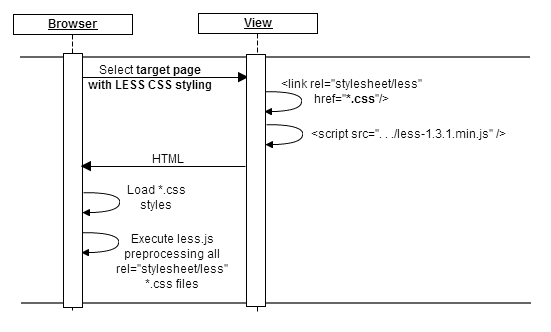
A simple sample code is provided below. Note that this technique allows extending any CSS stylesheet with LESS functionality, including, for example, the jQuery Widgets themes, e.g., jqx.base.css.
HTML code for extending any *.css style with LESS commands.
<!DOCTYPE html>

<html>

<head>

<link type="text/css" rel="stylesheet/less" href=".../site.css" />

<link type="text/css" rel="stylesheet/less" href=".../*.css" />

<link type="text/css" rel="stylesheet/less" href=".../jqwidgets/styles/jqx.base.css" />

.

.

.

</head>

<body>

.

.

.

<script src="/Scripts/less-1.3.1.min.js" type="text/javascript"></script>

</body>

</html>
With LESS CSS, one can use very few base colors to automatically derive the color schema of the entire site. As an example, it is possible to define a @base_color, and specify the various colors as derived lighten() or darken() versions of the @base_color. For the full feature list see lesscss.org.
Leveraging LESS CSS to generate a family of colors, or an entire template.
@base_background_color: #c6Bc8d;

@selector_background_hover_color: darken(@base_background_color, 10%);

@selector_text_hover_color: lighten(@base_background_color, 40%);

.

.

.

.class1 {

    background-color: @base_background_color;

}

.class1:hover {

    background-color: @selector_background_hover_color;

    color: @selector_text_hover_color;

}
That’s it!
 Cloud OS Patterns
Leave a comment