In situations when the enterprise architecture does not grant the front-end tier access to a database, using the MVC4 WebSecurity is prohibitive. Using the middle-tier as a proxy to WebSecurity, which in turn, requires database access, is a simple solution.
This post describes how the AccountController of the MVC4 front-end delegates authentication to a middle-tier, which in turn, uses the WebSerurity wrapper over SimpleMembership. Attention is placed on encryption of the password, and use of a session token, which enables subsequent requests to the middle-tier to avoid the re-authentication.
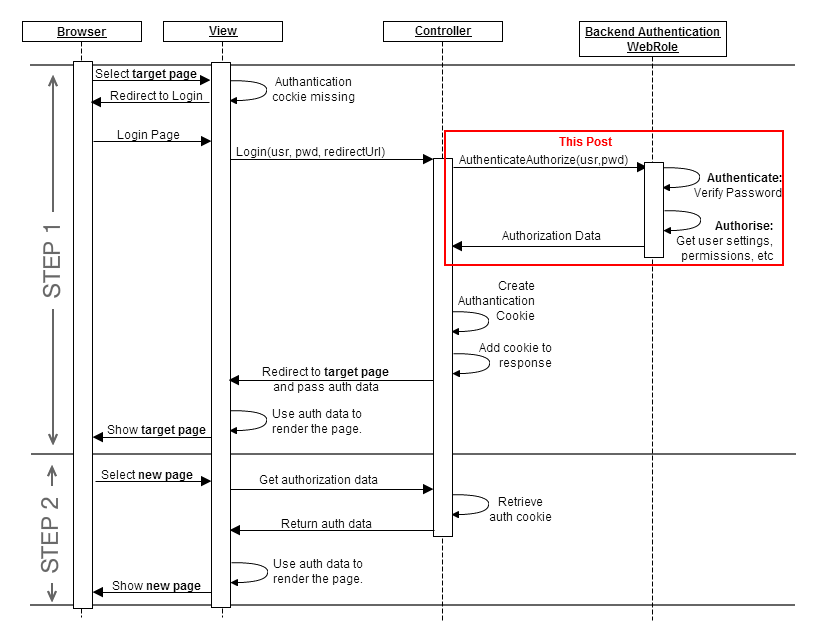
The context sequence diagram described below starts with the browser requesting a page prior to login. In step1, upon receipt of the request, the view cannot find the authentication cookie, and forwards the request to the login page. The login form collects the login information and passes it to controller. At this point, the controller invokes Web security or any other authantication mechanism to verify the credentials provided. The handshake between the front-end and the middle-tier is supported by encrption, and optionally, may be extended by chalenge response.
The code for delegating the authentication start with assembling the MD5 hash token sent to the REST web-service; notice the use of the ‘LoginApi’ method name, which is defined in the middle-tier code section. A time-stamp is used to ensure that the MD5 hash changes with each authentication request. The ‘model’ from the login form is used to obtain the user name and password. In addition, a private key (string) is used to prevent reproducing the MD5 hash from the components which are in the clear. A key component of the approach is the symmetric encryption of the password; the same algorithm is used to decrypt as was used to encrypt. We also need to be careful with the encoding of the data being sent. The response format is assumed to be JSON. If authentication succeed, the successful login code is executed; otherwise, the user is notified that the login failed.
C# MVC4 AccountController front-end code delegating authentication to the middle-tier.
[HttpPost]

[AllowAnonymous]

[ValidateAntiForgeryToken]

public ActionResult Login(LoginModel model, string returnUrl)

{

	string timeStamp = DateTime.Now.Ticks.ToString();

	string token = HttpUtility.UrlEncode(Encoding.UTF8.GetString(

md5.ComputeHash(Encoding.UTF8.GetBytes(

model.UserName + model.Password + timeStamp + privateKey))));

	string encryptedPassword = HttpUtility.UrlEncode(model.Password.Encrypt(privateKey));

	string url = BaseUrl + "account/loginApi?usr=" + model.UserName

+ "&epwd=" + encryptedPassword

+ "&rm=" + model.RememberMe

+ "&ts=" + timeStamp + "&tk=" + token;

	string resultJson = new WebClient().DownloadString(url);

	Dictionary result = json.Deserialize<Dictionary>(resultJson);

	if (result["status"] == "success")

	{

             ... // code for successful login

	}

	else

	{

                // Notify the user of the login failure

		ModelState.AddModelError("", "Incorrect user name or password.");

		return View(model);

	}

}
The middle-tier defines the ‘LoginApi’ method taking the various components of authentication request and passes them onto WebSecurity. The authenticity of the request is verified by re-generating the token. The first step is to decryp the password; the same symmetric algorithm is applied to decrypt as was used to encrypt. Once the password is available, the token is verified by reproducing the MD5 hash; note that a private key, stored separately in the front-end and the middle-tier, is used when generating the MD5 hash, preventing token validation when the private key does not match. If the verification succeeds, we know that the request is good, it is appropriate to verify the credentials with WebSecurity, which uses a connection string to connect to the simpleMembershpi database storing the credentials. If the credentials are verified the method returns ‘success’ in JSON format; otherwise, it returns ‘failure’ in JSON as well.
C# MVC4 AccountController code within the middle-tier authenticating against WebSecrity on behalf of the front-end.
[AllowAnonymous]

public string LoginApi(string usr, string epwd, string rm, string ts, string tk)

{

	string Password = epwd.Decrypt(privateKey);

	string token = Encoding.UTF8.GetString(md5.ComputeHash(

Encoding.UTF8.GetBytes(usr + Password + ts + privateKey)));

	if (ModelState.IsValid &&

WebSecurity.Login(usr, Password, persistCookie: bool.Parse(rm) &&

tk == token))

	{

		string roles = "";

		foreach (var r in Roles.GetRolesForUser(usr)) roles += "," + r.ToString();

		if (roles.Length == 0) roles = "user";

		sessionsDict[usr] = new Session() { UserName = usr, Token = token };

		return "{ \"status\": \"success\", \"roles\":\"" + roles.Substring(1) + "\" }";

	}

	else return "{ \"status\": \"failed\" }";

}
The symmetric encryption algorithm demonstrated here is a simple wrapper on the TripleDESCryptoServiceProvider available as part of the .NET libraries. The ‘encrypt’ and ‘decrypt’ functions are using the common ‘transform’ method to perform their operation. It is critical that the ‘vector’ is matching for the encrtyption and decryption steps to work correctly; here it is defined as a static byte[] for simplicity. Notice that the transform function is simply appplying the CryptoStream it receives on a CryptoStream in the most basic manner.
C# symmetric encryption extension library shared across front-end and middle-tier.
public static string Encrypt(this string text, string key)

{

	return Transform(text, _cryptoService.CreateEncryptor(key.GetBytes(), vector));

}


public static string Decrypt(this string text, string key)

{

	return Transform(text, _cryptoService.CreateDecryptor(key.GetBytes(), vector));

}


private static SymmetricAlgorithm _cryptoService = new TripleDESCryptoServiceProvider();

// static vector to ensure match between Encrypt and Decrypt

private static byte[] vector = ("MyPrivateKey12345").ToString().GetBytes();

// Symmetric transform used for both Encrypt and Decrypt

private static string Transform(string text, ICryptoTransform cryptoTransform)

{

	using (MemoryStream stream = new MemoryStream())

	{

		using (CryptoStream cryptoStream =

new CryptoStream(stream, cryptoTransform, CryptoStreamMode.Write))

		{

			cryptoStream.Write(Encoding.Default.GetBytes(text), 0, text.Length);

			cryptoStream.FlushFinalBlock();

		}

		return Encoding.Default.GetString(stream.ToArray());

	}

}
In conclusion, we have a login method in the AccountController of the front-end, delegating to a LoginApi method of the middle-tier; both share the use of a private key and a symmetric encryption algorithm. That’s it.

 Cloud OS Patterns
Leave a comment